The NREMT Has
EVOLVED.
Your Study App Hasn't.
Rounds is built by real EMS instructors and shaped by the students using it, for today's NREMT.


Every Question Type,
And How To Master Them.
The NREMT added new interactive question formats: Build List, Options Box, Drag and Drop, and the Clinical Judgment Scenario. Most prep apps still haven't caught up. Rounds shows you every type, then walks you through it with a tutorial from real EMS instructors on how to get it right every time. Walk into the testing center ready for anything.
| Chest Pain | Asthma | Allergy | |
|---|---|---|---|
| Aspirin | |||
| Albuterol | |||
| Epi |
Feeling Ready
Isn’t Being Ready.
Most apps count how many questions you’ve done. That’s the feeling. Rounds measures the being: how you’d score on the NREMT today, updated after every quiz, with the exact topics and question types holding you back.
- Accuracy 84% · Keep this up
- Coverage 68% · 3 topics need a refresh
- Thinking level 76% · Lowest is Analysis
Other Apps Grade You. Rounds Diagnoses You.
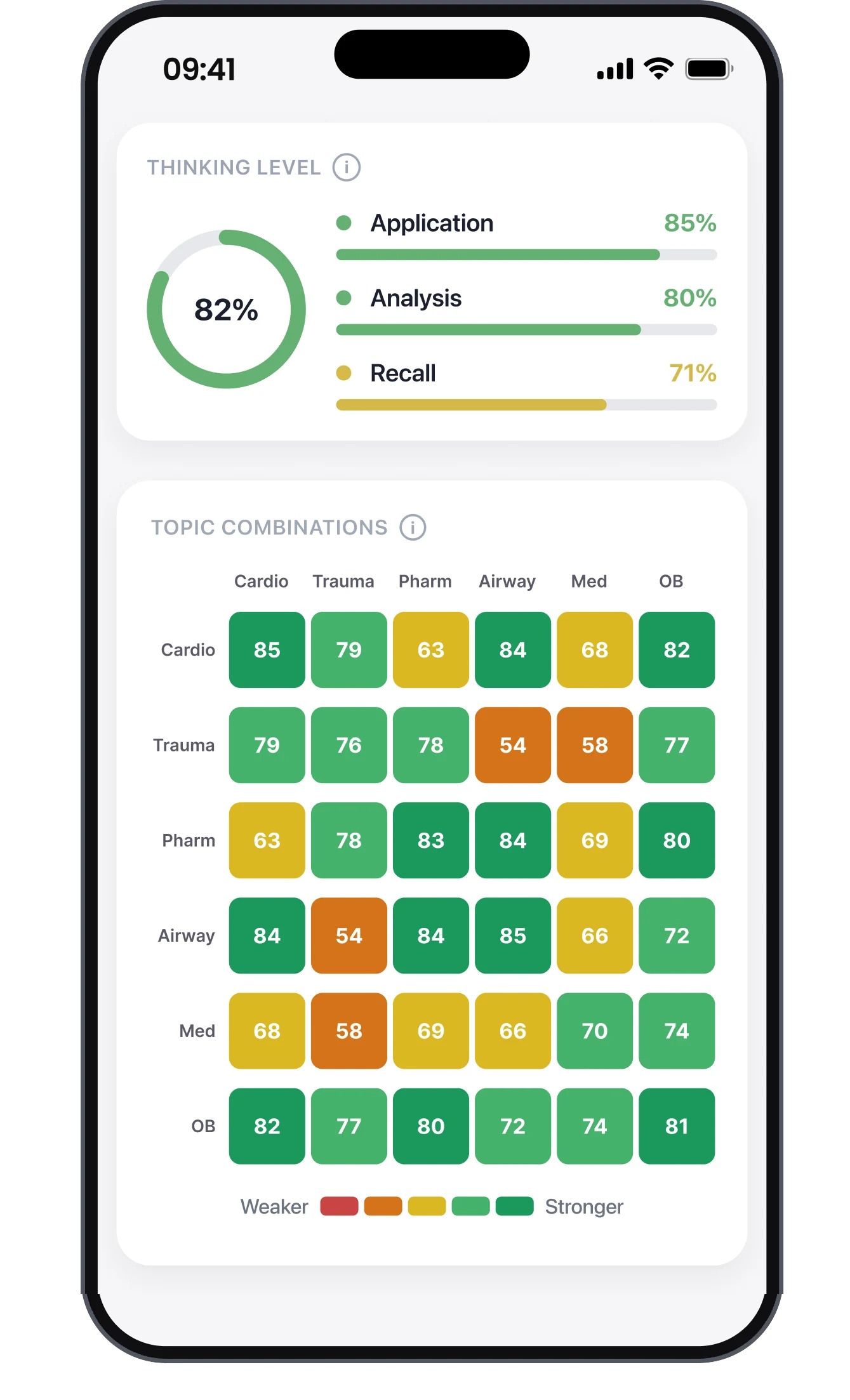
Where domains overlap is where students fail, and where most prep apps stop tracking. Rounds maps every cross-topic scenario, breaks down how you think at recall vs. application vs. analysis, and shows you exactly which factors are pushing your readiness up or down.
1/3 Of Students Fail Their First Attempt. Let's Make Sure You're Not One Of Them.

Memorizing isn't the same as knowing.
You can drill 1,000 questions and still fail. The NREMT doesn't ask what the right answer is. It asks what you would do next. Students who memorize patterns freeze the moment a scenario doesn't match what they remember. Recall-only prep sets you up for exactly that moment. Rounds trains the judgment the exam actually tests.
The exam evolved.
Other apps haven't.
The NREMT added new question formats in 2024 and 2025: Build List, Options Box, Drag and Drop, Clinical Judgment. A lot of apps are still serving questions written for the old test. You'll walk in prepared for an exam that no longer exists. Rounds is built for the exam you're actually taking, every new format included.
You can't fix what
you can't see.
A percentage score tells you that you got 72% right. It doesn't tell you which weaknesses are dragging you down, which topic combos are killing your accuracy, or if you're actually ready. Most apps stop at the score. Rounds shows the map: domain mastery, hidden weaknesses, and exactly what is moving your readiness.
"Built by the team behind Paramedic Flash, already trusted by thousands of EMS students nationwide."

Got Questions?
Who writes the questions?
Every question and explanation is reviewed, edited and signed off by a working EMS instructor before a student ever sees it. Nothing publishes until an instructor approves it. They teach this material in classrooms, ride trucks, and know what the registry actually tests.
Is it out yet?
Yes. Rounds is live on the App Store for iPhone. Your first 30 questions are free, from the whole bank. After that, Rounds Pro is an auto-renewing subscription, and you can cancel any time in your Apple ID settings. The App Store shows you the price before you confirm. It is built for the current NREMT, with the new question formats rolling out as they land. Android is in the works.
Which certification levels are covered?
Right now, EMT. The whole question bank is written for the EMT level and mapped to the current NREMT exam domains, and that is where every question we have published so far sits. AEMT and Paramedic are coming next. We are building those banks with the same instructor review the EMT bank got, and we would rather tell you they are not ready than sell you a thin version of them.
Studying medications? Our free guide covers the 8 drugs EMT questions are built around, with doses and the exam traps for each. You can also browse all of our free study guides.
How does Rounds know when I'm ready for the NREMT?
Rounds tracks your performance across three dimensions: domain mastery (Cardio, Trauma, Airway, and the rest), thinking level (Recall vs. Application vs. Analysis), and topic combinations (where two domains overlap, which is where most students lose points). Your readiness score isn't "questions completed." It's an estimate of how you'd score if you sat for the exam today, updated every quiz. When the score hits target, you know you're actually ready, not just done.
How is Rounds different from Pocket Prep, Medic Tests,
and other NREMT prep apps?
Two things. First, Rounds is built specifically for the post-2024/2025 NREMT, and Build List is live now, with the remaining new formats filling in release by release. Second, the readiness model. Most apps tell you what percentage of questions you've completed. Rounds tracks how you actually think (Recall vs. Application vs. Analysis) and where domains intersect, which is where most students lose points. Rounds Pro is one subscription with the whole question bank and every study mode in it. Your first 30 questions are free, then Pro renews automatically at the price the App Store shows you before you confirm, and you can cancel any time in your Apple ID settings.
What if I study with Rounds and still fail?
If you are on Rounds Pro, your Readiness Score said Ready, and you fail the NREMT anyway, you get your next 3 months of Pro free. That is the Pass Guarantee. It is service time, not cash, and it has a few conditions so the score it hangs on is a real one. Read the full terms.
Can I use it with my classmates?
Yes. The global leaderboard lets you see exactly how you stack up against classmates, friends, and every other student grinding for the same exam. Watching your rank climb (or refusing to let someone pass you) turns solo studying into something you'll actually keep doing.
Will you keep adding new questions?
Yes. The instructor team adds new questions every release and revises older ones as the NREMT evolves. You won't open the app to a stale question bank, and you won't run out before exam day.
What if I find an error or want to flag a question?
Every question has a flag button. Tap it, tell us what's off (wrong answer, outdated protocol, typo, unclear stem), and your note goes straight to the instructor team for review. We respond and update fast. Your feedback is one of the main ways the content gets better.
Do I have to be in school to use it?
No. Rounds is for anyone preparing for the NREMT: current EMS students, refresher candidates, recertifying providers, first-time test takers, retakers. You don't need a course code, an instructor invite, or any school affiliation. Sign up with an email and start.
GET
ROUNDS.
On the App Store and Google Play now, built for the current NREMT, with the new question formats rolling out as they land. Your first 30 questions are free, then Rounds Pro is an auto-renewing subscription, cancel any time.
Multiple Choice
Read the stem, pick the single best answer.
The format every candidate already knows. Read the stem, pick the one best answer from four options. Still the backbone of the NREMT at every certification level.
Rule out the two worst answers first. There are almost always two obvious distractors. Then pick the one that matches the ABCs of EMS: Airway before Breathing before Circulation before everything else. If two answers seem equally correct, pick the one that's safer for the patient, earlier in the call, or less invasive.
Multiple Response
Select every correct answer. No partial credit.
You're given a list of options and you have to check every correct one. Miss just one and the whole question is wrong. No partial credit, no "close enough."
Read every option as its own true/false question. Don't compare options to each other. That's the trap. Each box is either right or wrong independently. If you're under 80% confident on a box, leave it unchecked. No partial credit means one wrong pick costs the whole question.
Build List
Drag and reorder the list into the correct sequence.
A digital skill sheet. You're shown a list of assessments, interventions, or steps (already on screen) and you drag them up or down until they're in the correct order. Sequence matters. One step out of place and the whole question is wrong.
These mirror skill sheets: primary assessment, patient handoff, medication administration. If you can recite the protocol out loud, you can order the list. Anchor the first and last items first (they're usually the easiest to place), then fill the middle. Never guess order. Revisit the scenario until the sequence is logical.
Options Box
Match rows against columns. Every cell counts.
| Chest Pain | Asthma | Allergic Rxn | |
|---|---|---|---|
| Aspirin | |||
| Albuterol | |||
| Epinephrine |
A grid matrix. You evaluate every row against every column, checking every cell that applies. Used for matching medications to indications, assessments to body systems, or interventions to conditions.
Go row by row, not column by column. Take each patient condition or scenario and ask: "which interventions apply to THIS?" Check them all before moving down. Thinking by column (what does this intervention treat?) burns time and increases errors. Every cell counts; one miss = full miss.
Drag and Drop
Classify findings into the right category.
Drag answer choices into the correct categories or bins. Unlike Build List, there's no forced sequence. You're sorting, not ordering. Used for classifying assessments, matching signs to conditions, or repositioning findings.
Sort by most-definite first. Find the findings that are clearly one category (classic textbook signs) and place them before touching the ambiguous ones. The obvious placements force the harder ones into their correct slots by process of elimination.
Clinical Judgment Scenario
A full patient case across three phases. AEMT & Paramedic only.
The big one. A single patient case unfolds across three phases: En-Route, Scene, and Post-Scene, with multiple embedded questions in any format. You reference earlier phases while answering later ones, just like real clinical thinking.
Each phase builds on the last. Your decision in En-Route changes what's correct in Scene. Re-read earlier phases before answering later ones (you can). Answer as the provider you'll actually be on day one, not the textbook answer. If interventions compete, run the ABC/DE algorithm and pick the one with the biggest immediate threat-to-life fix.
Every format on the NREMT
Pick any question type to see how Rounds trains you on it, including the strategy to master it.